Troubleshooting Guide for Oil-Free Scroll Compressors
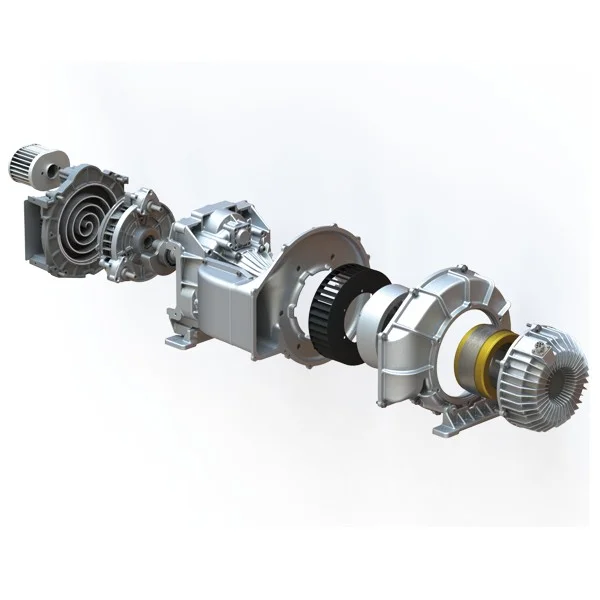
Oil-free scroll compressors have become a cornerstone in industries that demand clean and reliable compressed air, such as pharmaceuticals, food processing, electronics manufacturing, and medical equipment. Unlike oil-lubricated compressors, oil-free scroll compressors operate without the use of oil in the compression chamber, which ensures a contaminant-free output and reduces maintenance challenges associated with oil management. Despite their advantages, oil-free scroll compressors are not immune to operational issues. Understanding common problems and their solutions is essential for maximizing performance, prolonging equipment life, and reducing downtime.
This guide provides a comprehensive troubleshooting framework for oil-free scroll compressors, covering common issues, diagnostic methods, preventive strategies, and advanced tips for professional operators.
1. Understanding the Basics of Oil-Free Scroll Compressors
Before diving into troubleshooting, it’s crucial to understand the operating principle of oil-free scroll compressors. These compressors consist of two interleaving spiral scrolls: one fixed and one orbiting. Air enters the compressor at the periphery of the scrolls and is gradually compressed as it moves toward the center, where it is discharged. The absence of oil in the compression chamber ensures that the air remains uncontaminated, making it suitable for sensitive applications.
Key benefits of oil-free scroll compressors include:
-
Contaminant-free air – ideal for cleanroom, laboratory, and medical applications.
-
Low maintenance – no need for oil changes or filtration of oil-laden air.
-
Quiet operation – scroll designs produce less vibration and noise compared to piston or rotary screw compressors.
-
Energy efficiency – scroll compressors often require less energy for the same airflow compared to traditional compressors.
Despite these advantages, certain operational challenges can arise, which, if unaddressed, may compromise efficiency and reliability.
2. Common Issues and Troubleshooting Steps
2.1 Reduced Airflow or Pressure
Symptoms: The compressor delivers lower-than-expected pressure or airflow, even though the motor runs normally.
Possible Causes and Solutions:
-
Clogged Air Intake Filter
Dust and debris accumulation restrict airflow.
Solution: Inspect and clean or replace the intake filter regularly. Use filters recommended by the manufacturer to avoid performance issues. -
Air Leaks in the System
Loose connections, damaged hoses, or leaks in the piping reduce effective airflow.
Solution: Perform a thorough leak test using soapy water or ultrasonic leak detectors, and tighten or replace faulty connections. -
Blocked or Dirty Aftercoolers
Excessive heat in the compressed air reduces efficiency.
Solution: Clean aftercoolers and ensure proper ventilation. -
Worn or Misaligned Scrolls
Although rare, wear or misalignment of the orbiting scroll can reduce compression efficiency.
Solution: Contact a certified service provider for inspection and alignment. -
Overloaded Downstream System
Using too many tools or equipment simultaneously can exceed the compressor’s capacity.
Solution: Balance system demand or consider installing a larger-capacity unit.
2.2 Excessive Noise or Vibration
Symptoms: The compressor generates unusual noise or vibration during operation, potentially leading to mechanical stress or damage.
Possible Causes and Solutions:
-
Loose Mounting Bolts or Components
Vibration can occur if the compressor is not securely mounted.
Solution: Check all mounting bolts, tighten loose components, and ensure the unit is placed on a stable, level surface. -
Debris in the Compression Chamber
Foreign particles entering the compressor can produce unusual sounds.
Solution: Inspect air intake and use proper filters to prevent debris entry. -
Imbalance in the Motor or Scroll Assembly
Mechanical imbalance can lead to vibration.
Solution: Have the motor and scroll assembly checked and balanced by professionals. -
Wear in Bearings or Motor Components
Over time, bearings or motor parts can wear out, causing increased noise.
Solution: Schedule regular inspections and replace worn components promptly.
2.3 Overheating
Symptoms: The compressor operates at higher-than-normal temperatures, leading to frequent shutdowns or reduced efficiency.
Possible Causes and Solutions:
-
Insufficient Cooling
Blocked airflow around the compressor or dirty cooling fins reduce heat dissipation.
Solution: Ensure adequate ventilation, clean cooling fins, and maintain clear airflow paths. -
Excessive Ambient Temperature
Oil-free scroll compressors are sensitive to high environmental temperatures.
Solution: Relocate the compressor to a cooler area or install additional ventilation or cooling systems. -
Continuous Operation Beyond Duty Cycle
Operating the compressor beyond its rated duty cycle generates excessive heat.
Solution: Follow manufacturer guidelines for duty cycles and implement rest periods if needed. -
Electrical or Mechanical Resistance
Excessive current draw or friction can raise temperatures.
Solution: Monitor electrical components and lubricate motor bearings if applicable (outside the compression chamber).
2.4 Frequent Tripping or Electrical Issues
Symptoms: The compressor motor frequently trips on overload or fails to start.
Possible Causes and Solutions:
-
Electrical Supply Problems
Voltage fluctuations or incorrect wiring can cause motor trips.
Solution: Verify the power supply voltage and connections. Use stabilizers or surge protectors if necessary. -
Overloaded Motor
Operating under extreme pressure or airflow conditions may overload the motor.
Solution: Check system demand and adjust operating parameters to match compressor capacity. -
Faulty Sensors or Controls
Malfunctioning pressure switches or thermal sensors can trigger false shutdowns.
Solution: Inspect and replace faulty sensors or control units.
2.5 Excessive Condensation or Moisture
Symptoms: Water appears in the compressed air line or condensate drains excessively.
Possible Causes and Solutions:
-
High Ambient Humidity
Moist air entering the compressor leads to condensation.
Solution: Install dryers or moisture separators downstream. -
Insufficient Aftercooling
The compressed air is not adequately cooled before discharge.
Solution: Check the aftercooler function and clean or replace if necessary. -
Improper Drainage
Clogged or malfunctioning condensate drains cause water accumulation.
Solution: Inspect and maintain automatic drains or manually drain condensate. -
Frequent Start-Stop Cycles
Rapid cycling may prevent condensate from being expelled effectively.
Solution: Adjust operational cycles or add buffer tanks to stabilize airflow.
3. Advanced Troubleshooting Tips
For experienced operators, advanced troubleshooting can improve performance and extend equipment life:
-
Monitor Vibration Patterns: Use vibration sensors to detect early signs of misalignment or bearing wear.
-
Thermal Imaging: Infrared cameras can identify hotspots in the motor or scroll assembly before failure occurs.
-
Pressure and Flow Logging: Continuous monitoring of pressure and airflow trends can help predict system inefficiencies or equipment fatigue.
-
Integration with Building Management Systems (BMS): In large facilities, connecting compressors to BMS allows real-time monitoring and automated alerts for potential issues.
4. Preventive Maintenance Tips
Proactive maintenance is the most effective way to reduce troubleshooting frequency and extend the lifespan of oil-free scroll compressors:
-
Regular Filter Inspection and Replacement
Maintain intake and exhaust filters according to manufacturer guidelines. -
Monitor Operating Temperatures
Keep compressors within recommended temperature ranges to prevent overheating. -
Inspect Scrolls and Bearings
Schedule periodic inspections for wear, misalignment, or unusual noise. -
Check Electrical Components
Ensure wiring, fuses, and control systems are functioning properly. -
Maintain a Clean Environment
Keep the compressor area free of dust, debris, and excess moisture. -
Document Performance Data
Track pressure, airflow, and temperature to identify trends or early warning signs. -
Plan Scheduled Downtime
Allow the compressor to rest and cool periodically to prevent overheating and wear.
5. When to Contact a Professional
While many troubleshooting steps can be performed in-house, certain issues require professional service:
-
Scroll misalignment or wear
-
Motor failure or major electrical faults
-
Persistent vibration or noise that cannot be resolved through basic checks
-
Complex control system failures
Certified service providers can perform detailed diagnostics, part replacement, and recalibration to ensure the compressor operates reliably. Partnering with experienced professionals is particularly important in industries with strict air quality requirements, such as pharmaceuticals or electronics manufacturing.
6. Conclusion
Oil-free scroll compressors are essential for applications requiring clean, reliable compressed air. However, operational issues such as reduced airflow, overheating, excessive noise, and electrical faults can occur. Understanding the root causes, following systematic troubleshooting steps, and implementing preventive maintenance are crucial for maintaining optimal performance and extending equipment lifespan.
By staying proactive, operators can minimize downtime, reduce maintenance costs, and ensure the long-term efficiency of oil-free scroll compressors. Regular inspections, proper installation, and adherence to manufacturer guidelines are key components of a successful maintenance strategy. Advanced monitoring tools, predictive maintenance techniques, and professional support further enhance reliability and performance in critical industrial applications
www.glcompressor.com
glcompressor
About Author
